
 Test case version controlWhen carefully designed cases are deleted or changed without context, the team loses visibility into test coverage. Armoury can retain up to 100 change records.
Version Control
A history archive for every test case
Version control is not only for software engineers. QA teams also need a reliable history of test case changes, so when issues appear, the team can trace work back to a stable state.
Try Armoury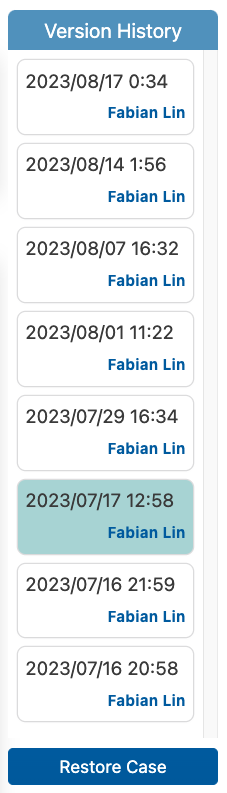
How It Works
How test case version control works
Armoury keeps an original record for each test case. Every time the case is edited, the system creates a historical copy. You can browse previous versions at any time and restore the version your team needs.
The example on the right keeps evolving: first the precondition changes, then acceptance coverage is added, and finally the case is restored to a stable version. This mirrors how test cases move during real product iterations.
Login flow regression test
Create a stable baseline
V1
Case #A-102
Stable
PreconditionUser account is active
Test stepEnter credentials and submit
Expected resultRedirect to Dashboard
Why It Matters
Why test cases need version control
Version control is an investment in risk management. Before problems happen, it may feel unnecessary. When problems do happen, preserved history helps the team respond quickly and with evidence.
Test case version controlWhen carefully designed cases are deleted or changed without context, the team loses visibility into test coverage. Armoury can retain up to 100 change records. Test Run version controlTest Runs contain selected cases worth preserving. Use duplicated Runs to track the history of each test execution.
 Deletion recordsDeleted cases disappear from the group, but the deletion action remains in reports for accountability. Case restoration is planned for a future release.
 Basic audit logsArmoury records creation, deletion, changes, and test result updates, helping teams observe the testing process and preserve operating context.
QA Knowledge
Test cases are part of the product roadmap
We encourage teams to keep test cases even when they are no longer used. They become part of the product's historical roadmap and explain why certain coverage existed in the first place.
When QA teams manage test cases the way developers manage code, they keep the context needed for requirement changes, defect investigation, handover, and training.
Fine-Grained Control
Case-level version control built for QA work
Excel and Google Sheets also provide version history, but once a spreadsheet contains more than 50 test cases, scrolling through entire file versions becomes a burden. Armoury gives each test case its own history, audit trail, and restore path.
Are You Ready?
Start your free Armoury+ trial
Register for the free plan, or contact our sales team to request a two-month trial for a paid plan. Smaller teams can also ask about tailored options.